Subject: You can use Skype to connect and LISTEN to the bible
study directly from your computer (at no cost).
There is a Freeconferencing connection with Skype. To setup an account and download Skype press http://www.skype.com

Once you have Skype setup, Go to Add a Contact and do a search for Skype
Name = freeconferencing.7124320075, and
accept the first one that comes up. It will automatically accept you as a
contact once you install it.
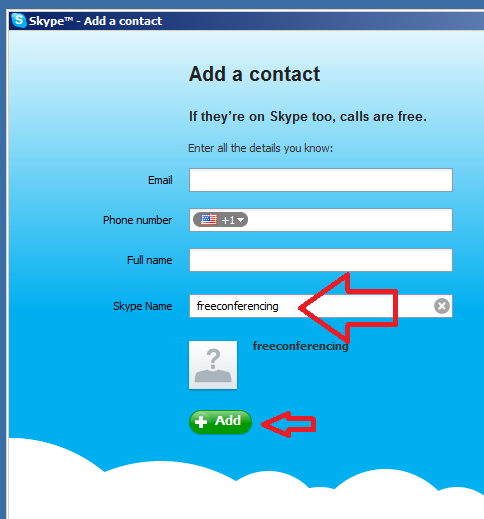
You do not need to add a telephone # to the contact.
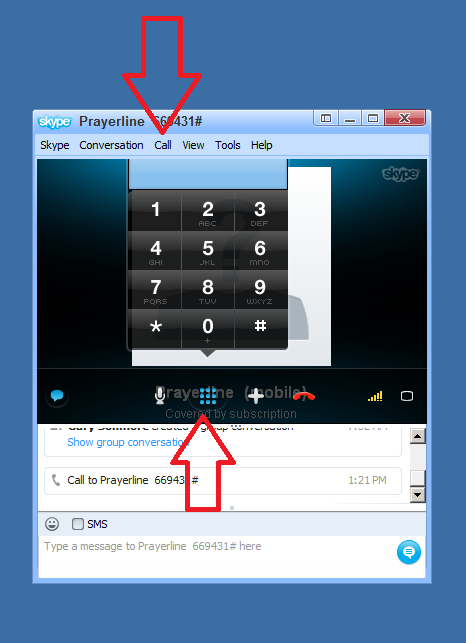
The trickiest part of this is when you CALL it, you need to bring up the Dial Pad in Skype in order to enter the pin # for the conference line (i.e. 760863#). To do this you have to go to the CALL menu (large red arrow below), then to SHOW DIAL PAD (or press the DIAL PAD button shown by small red arrow). Then you have to use your mouse to press the first # of the pin # ( i.e. 7), then you can use your number pad to dial the rest (i.e. 60863#).
This provides a much better digital sound then a telephone.
[GO TO SHOW DIAL PAD AT EITHER RED ARROW]
You can test it anytime.
PRESS HERE TO RETURN TO HOME SCREEN